Quick Bill Analyzer: Grade Your Texas Electricity Bill From One Photo
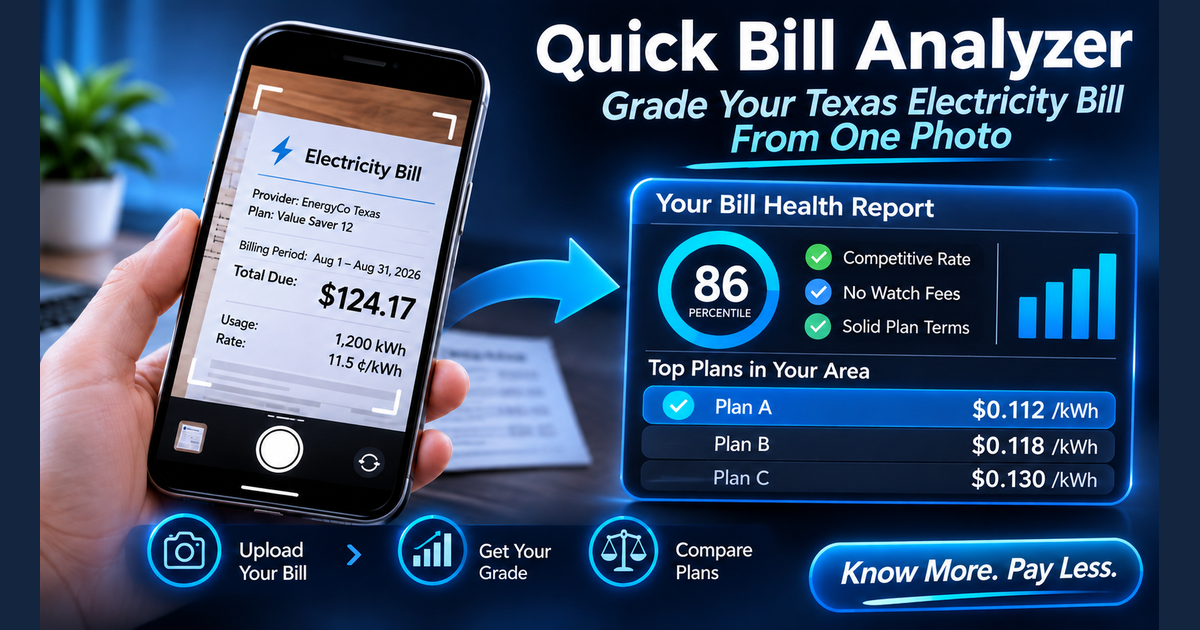
Most electricity bills are hard to read and easy to ignore. The Quick Bill Analyzer turns one bill into a plain report card. Upload a photo or PDF, check the details it pulled out, and see how your rate, fees and plan terms stack up against plans in your area.
How it works
- Upload your bill. Drop in a JPEG, PNG or PDF up to 10 MB. A clear, well lit photo of the page that shows your charges works best.
- Check what it read. The analyzer pulls out your provider, plan name, billing period, total due, energy rate, monthly usage and ZIP code. If you have solar, it also looks for exported kWh, your buyback rate and any battery program credit. You can correct anything it missed.
- Read your results. If it found your ZIP code and usage, the plan comparison starts on its own. If not, fill in the missing fields and run it yourself.
Your Bill Health Report
The first thing you see is a Bill Health Report. Each line is marked as healthy, worth a look, or a concern:
- Rate Score. A percentile that shows how your rate compares with the plans currently available in your delivery area, for example lower than 86% of them. A bar shows where your rate sits between the lowest, middle and highest plan rates.
- Blended Rate. What you paid per kWh after all credits, compared with the median plan rate in your area, with a pill such as "Well below average".
- Monthly Service Fee. Whether your bill shows a base charge, and how much.
- Minimum Usage Fee. Whether one was charged on this bill.
- Bill credits. Whether your plan appears to use a usage based credit.
- Plan type and Contract End Date. Fixed or variable, and when your contract ends if the bill prints it.
- Late fees and TDU Delivery charges (what your delivery company bills per kWh and per month), when they appear on the bill.
- Solar Export Rate and VPP Credits for solar homes, such as whether your buyback rate is above average and whether a battery program credit is active.
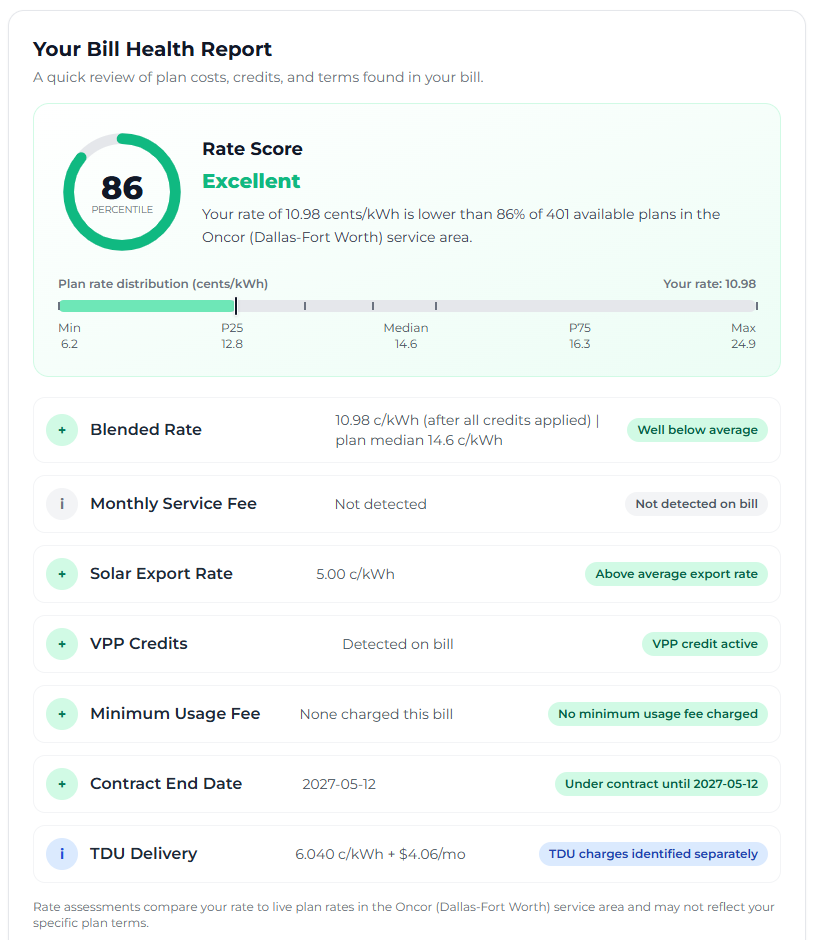 Example based on real results: a Bill Health Report for a solar home in the Oncor area.
Anything flagged as a concern is also collected in a short Red Flags list at the end, along with a few possible improvements.
Your bill verdict and plan comparison
Below the report, the analyzer compares your current rate with plans available in your area. The verdict tells you whether your rate looks competitive or shows an estimated monthly and yearly difference. The verdict is based on 10 to 14 month plans, so your rate can still be called competitive when a shorter plan would cost less. In that case the verdict says so and gives the estimated yearly amount, with a reminder that shorter plans renew sooner, often at a different rate.
Solar homes get a side by side Solar Plan Comparison of your current plan and the recommended solar plan. It shows energy rate, TDU delivery, export credits and VPP credits, then an estimated monthly cost, an all in rate before credits and a blended rate after credits. The bottom line is an estimated yearly difference, which can be an extra cost. A plan with a cheaper energy rate can still cost more once lower export credits and a lost battery credit are counted.
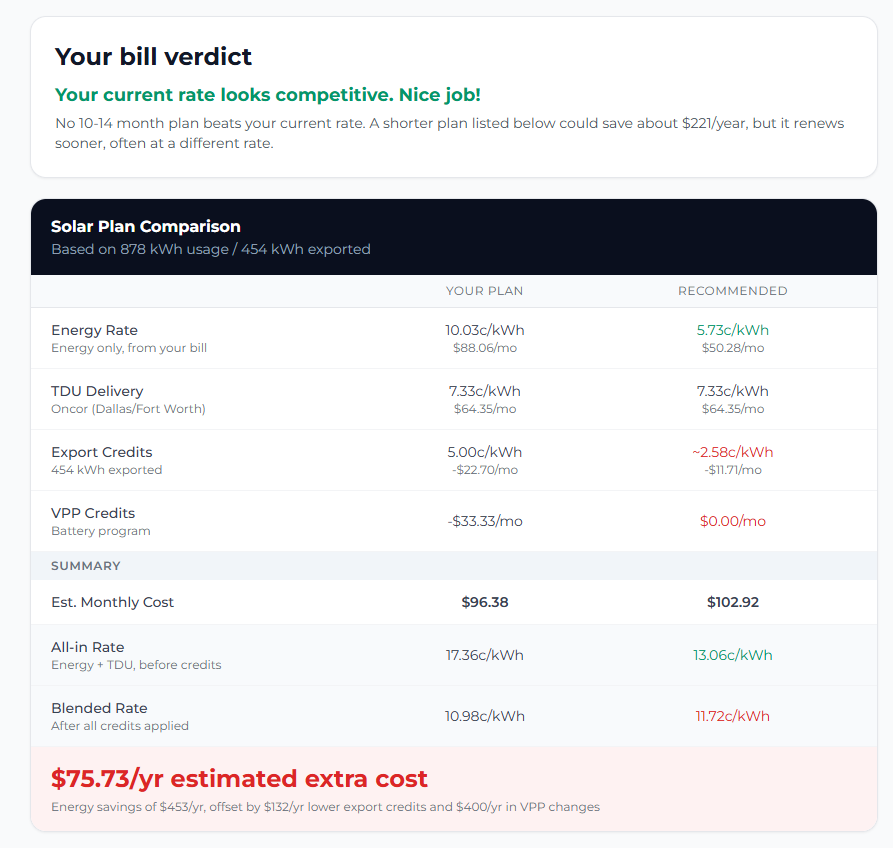 Example based on real results: a competitive verdict, and a solar comparison where the cheaper energy rate still costs more overall.
Next comes a list of top plans in your area with their price at 1,000 kWh. Tap any plan to see its details. The first plan shown is the best 10 to 14 month plan. Shorter plans that may cost less today are listed below it with an estimated annual savings figure. When some of a plan's terms could not be confirmed, or its buyback rate is assumed at wholesale, the listing says so and asks you to confirm with the provider before enrolling.
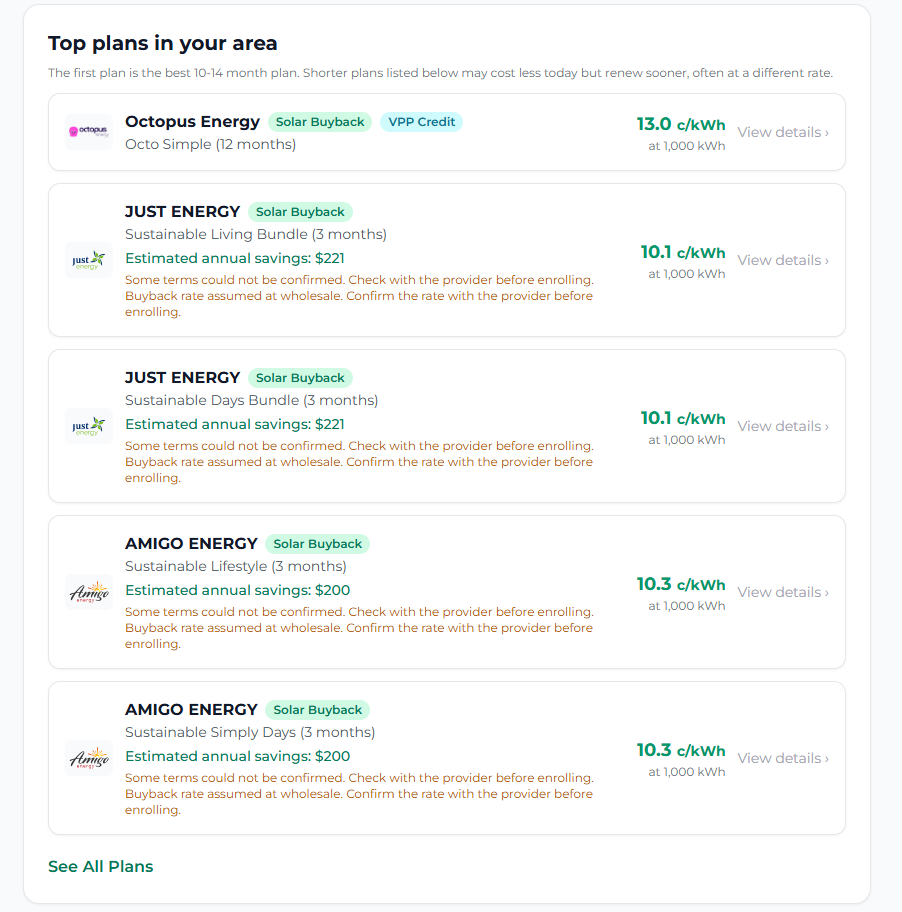 Example based on real results: the top plans list, with confirm notes on shorter plans.
Small businesses can choose Business before or after uploading. Plan prices then include small business delivery charges. Business solar comparisons are not available yet.

What the numbers are, and are not
Every figure in the comparison is an estimate. Your bill shows one month, so the analyzer treats that month as typical and repeats it for a whole year. Real usage is rarely that steady. A July bill and a March bill can point to different plans, especially when a plan has bill credits, minimum usage fees or cheaper night hours that depend on how much you use and when.
The analyzer does not:
- Look at your Smart Meter Texas history or how your usage changes month to month
- Switch your plan or sign you up for anything
- Promise a savings amount. Results are informational, not guaranteed.
When you want a decision, not a snapshot
The Quick Bill Analyzer is a fast way to see whether your bill deserves a closer look. If it does, a WattTrim audit goes further. You snap a photo of your bill, approve one Smart Meter Texas email, and the audit prices every plan against up to 12 months of your actual usage, including bill credits, delivery charges and time of use hours. There are no files to download or upload.
If you have a WattTrim Sentinel subscription, Your Personalized Profile View in the Sentinel portal ranks plans on your own meter data as it comes in, rather than one month repeated.
Your privacy
Your bill image is read in real time to pull out the details above. It is not stored, and your information is not sold or shared.
Put This Knowledge to Work
Compare your current plan against 1,500+ options across all 6 Texas TDU service areas, including exclusive broker-negotiated rates not found on PowerToChoose.org. Always free.
Trim My BillGridWise Audit shows the plans. WattTrim audits your bill to find your savings.

Keep Reading


Frequently asked questions
Is the Quick Bill Analyzer free?
Yes. There is no cost and no account needed.
What kind of file can I upload?
A JPEG, PNG or PDF up to 10 MB. A clear photo or a digital PDF of your bill gives the best results.
What if it reads something wrong or misses my ZIP code?
You can correct any value before comparing plans, and type in your ZIP code if it was not found.
Why is my estimate different from my real savings?
The analyzer prices one month as if every month were the same. Your real costs change with the seasons. A full audit uses your actual usage history instead.
Does it work for solar homes?
Yes. It reads your exported kWh, buyback rate and battery credits when they appear on your bill, and compares your current plan with solar plans in your area.
Does it work for business accounts?
Yes, for small businesses without demand charges. Business solar comparisons are not available yet.