GridWise Profile: Your Personal Electricity Savings Dashboard
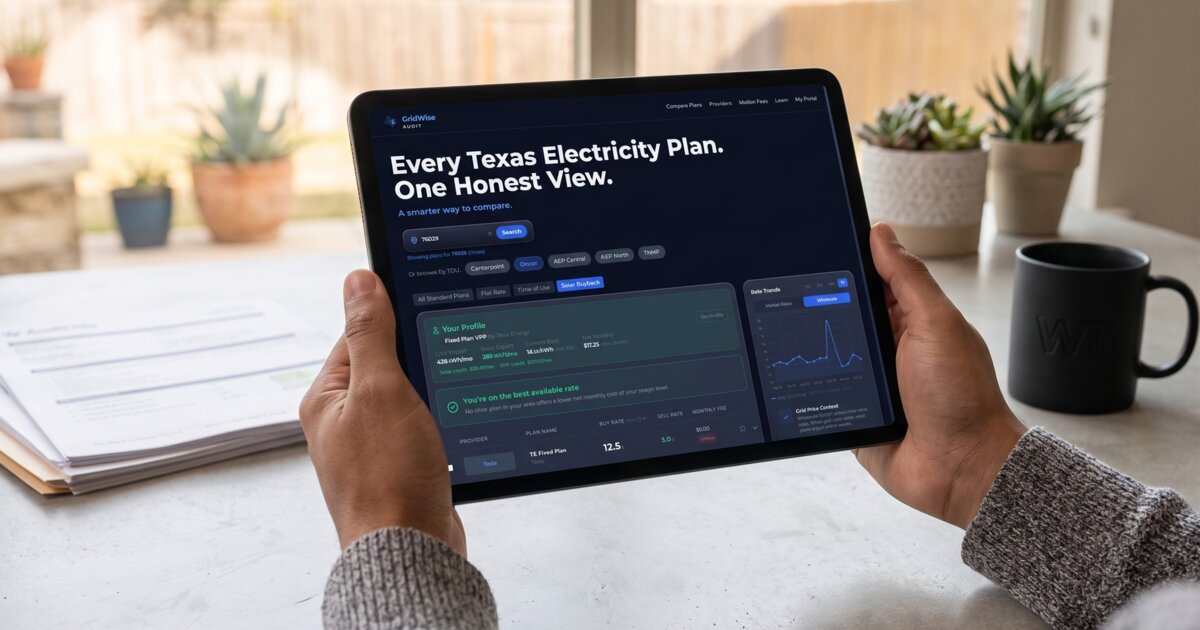
The GridWise Profile View uses your real Smart Meter interval data to break down exactly when and how you use electricity, then matches your usage pattern against every available plan in your service area. This continuous monitoring approach catches savings opportunities that a one-time audit would miss, including seasonal shifts and new plans entering the market.
What Is GridWise Profile Mode?
GridWise Profile is a personalized comparison mode that instantly overlays your actual home energy data onto every plan in our database. Instead of estimating costs from generic usage averages, Profile mode calculates what each plan would actually cost you based on your real smart meter history.
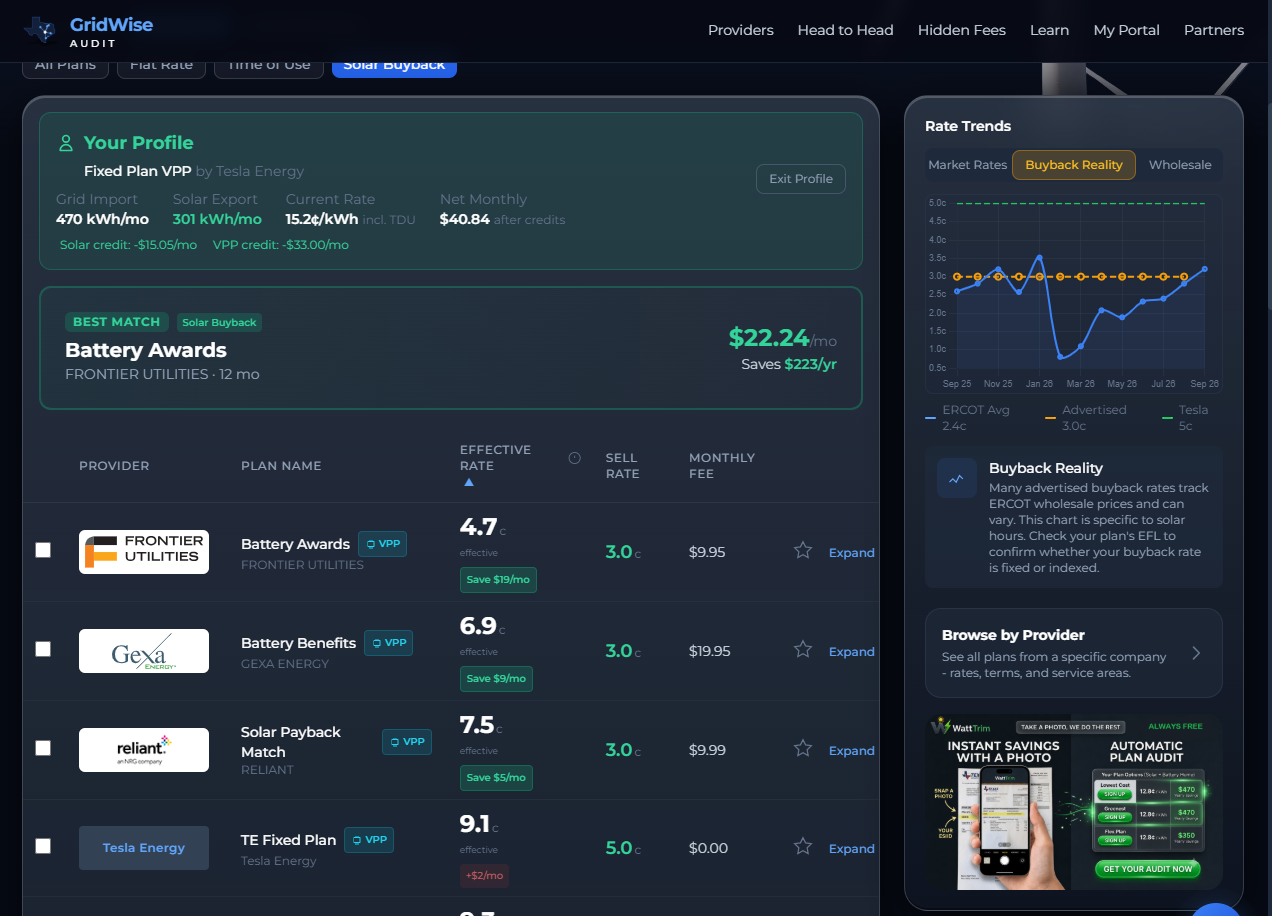
When you activate Profile mode, the base GridWise layout stays exactly the same. Your category tabs, filters, and plan rows all remain in place. But the data layer changes completely. Every plan row gains a green "Save $X/mo" or red "+$X/mo" savings badge calculated against your current electricity costs. A Best Match card highlights the plan with the lowest net monthly cost for your home.
If your current plan already beats every available alternative, Profile tells you that directly with a "You're on the best available rate" confirmation instead of recommending a switch that would cost you more.
An Extension of Your WattTrim Investment
If you are a WattTrim Sentinel Monitoring subscriber, you have already done the work. You uploaded your smart meter data, entered your current plan details, and built a complete energy profile in the WattTrim Portal. GridWise Profile takes that same profile and puts it to work here.
There is no second signup, no re-entering your plan details, and no extra steps. Profile mode reads directly from the subscriber profile you already maintain in the WattTrim Portal. Your usage history, current rate, solar exports, VPP credits, service area, and plan information all carry over automatically.
This means GridWise Profile is always as current as your portal data. When market rates shift or a new wave of plans hits the Texas market, you can open GridWise, toggle Profile mode, and instantly see how every new plan stacks up against your actual costs. No waiting for a new audit report.
And when your usage patterns change (a new season, a new appliance, a home renovation), your profile updates automatically. Sentinel pulls fresh Smart Meter data weekly, so your personalized view stays current without any manual steps.
The Math Behind the Numbers
Most comparison tools take your average annual usage, multiply it by an advertised rate, and call it a day. That flat-average math is how homeowners get burned by seasonal spikes. A plan that looks cheap at 1,000 kWh/month might hit expensive pricing tiers during a 2,000 kWh Texas summer.
GridWise Profile runs a month-by-month piecewise cost analysis using the same calculation engine that powers the WattTrim premium audit system. Here is what that means in practice:
- Your most recent 12 months of historical smart meter data are evaluated individually
- Each month's actual kWh consumption is run through the plan's real pricing tiers, not a blended average
- Regional TDU delivery charges (Oncor, CenterPoint, AEP, TNMP, LP&L) are calculated separately using exact delivery-only rates for your service area
- The result is what you would have actually paid on that plan over a full calendar year, accounting for every seasonal swing
True Cost for Solar Customers
Most plan comparison tools show solar buyback plans at a single advertised rate. That number bakes in assumptions about how much energy you export each month. For example, one major provider assumes 475 kWh of monthly exports when calculating their advertised average price per kWh. If your home exports more or less than that assumption, the advertised rate has nothing to do with what you would actually pay.
Profile mode removes the guesswork. It pulls your real export data from your Smart Meter history and calculates what each solar plan would cost using your actual production, not an industry average.
- The rate column shows your effective cost per kWh, not the rate from the plan{"'"}s EFL. This effective rate accounts for your energy charges, export credits, base charges, TDU delivery fees, and any VPP battery credits, all calculated from your real usage.
- Plans with wholesale buyback rates use actual ERCOT settlement pricing during solar peak hours (10am to 7pm), averaged over 12 months, instead of a placeholder number.
- The savings badge on each row reflects the difference between what you pay today and what you would pay on that plan, using your real month-by-month import and export volumes.
Two homes on the same street with identical solar panel systems can have very different effective rates on the same plan, because their consumption patterns, export timing, and battery setups differ. Profile mode captures those differences where a generic comparison cannot.
Get Started with Profile View
Sign up for WattTrim Sentinel Monitoring and gain access to Profile Mode and your Portal energy dashboard. Your Smart Meter data is pulled automatically each week, your personalized plan comparisons stay current, and you can see exactly where your money goes, all from one place.
Already have an account? Log in to your Portal or visit the GridWise homepage and toggle Profile mode to see your personalized view.
Put This Knowledge to Work
Compare your current plan against 1,500+ options across all 6 Texas TDU service areas, including exclusive broker-negotiated rates not found on PowerToChoose.org. Always free.
Trim My Bill